With initial user feedback and concepts in place, I took to the next stage of the development process – creating a rough wireframe to get a sense of what application screens I would need to research and develop.
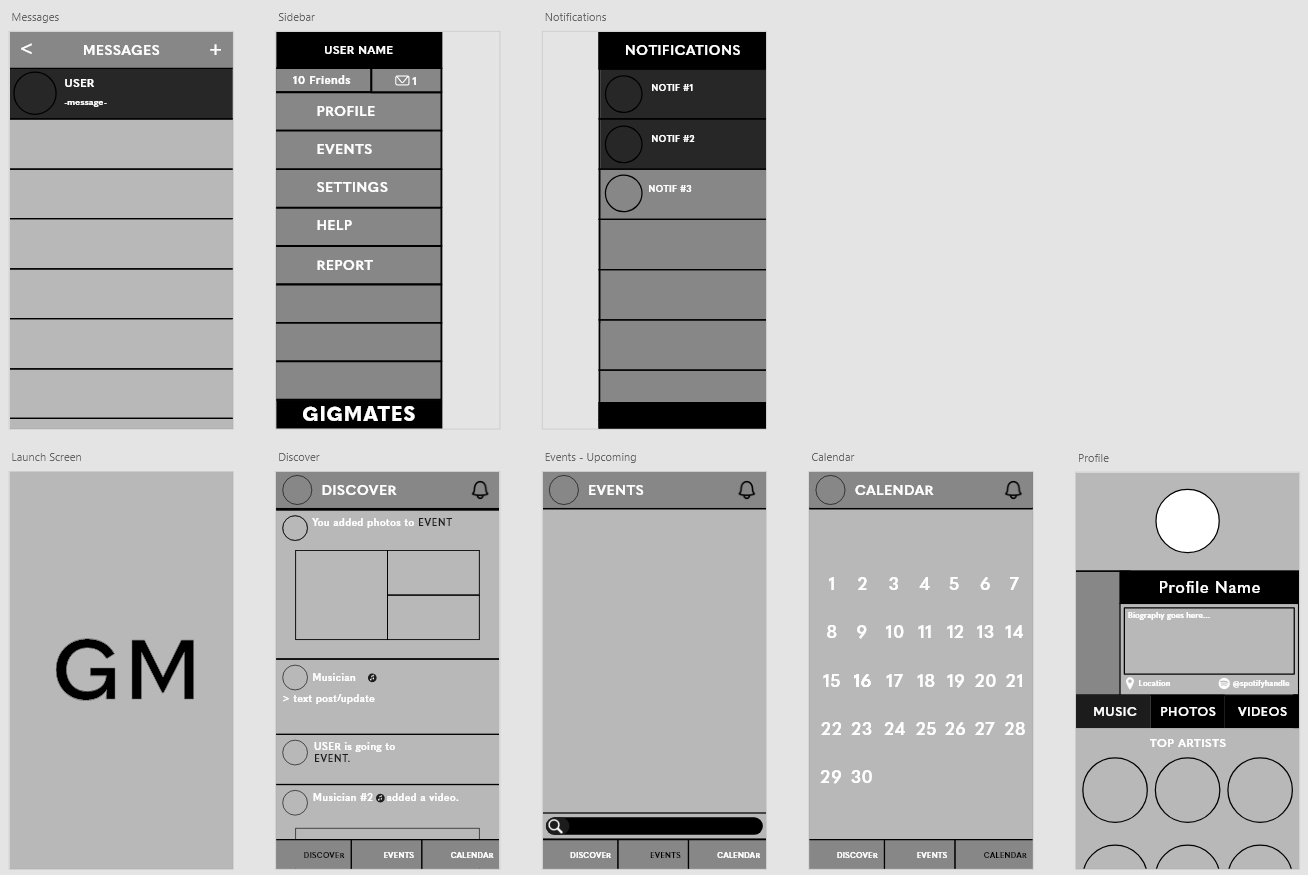
From initial brainstorming, I came up with five main pages that the app would be centred on –
- a ‘Discover’ page, where the user can post content and engage with their connections – essentially a news feed or timeline
- an ‘Events’ page, where the user can search for events, view upcoming and nearby events, purchase tickets or connect with other people attending the same event as them
- a ‘Calendar’ page, where the user can view all of their scheduled events in one place and share them with their connections
- a ‘Profile’ page, where the user can view their content, share their musical interests and talk about themselves
- a ‘Messages’ page, where the user can directly talk to other users and connections they make on the app.
On top of these, I created a launch page which would display the logo of the app and load it upon launching the app for the first time, and two overlay menus – one sidebar, which would provide the user with a call to action and a fast way to get to where they need, and a notifications menu which would alert the user of any updates they may be expecting within the app.
I now intend to narrow down on these pages and work on designing and prototyping the finer details, working out layouts, colour schemes and the best way for these pages to connect in order to ensure a clean and efficient user interface and a strong user experience.
 BA (Hons) Graphic Communication - Journal